Smart Home UI Kit: 18 Templates to Launch Your App Faster
That moment when you have a brilliant idea for a mobile application – maybe a new way to control home lighting, a dashboard for security cameras, or a central hub for all connected devices – but the reality of designing every single screen from scratch feels overwhelming. The gap between a concept and a clickable prototype can seem vast, filled with countless hours of pixel-pushing and component building. This is precisely where a resource like the Smart Home Application Mobile UI KIT shifts from being a nice-to-have to an essential accelerator, providing a robust, ready-made foundation that lets you focus on what truly matters: the unique logic and user experience of your own project.
A Practical Toolkit for Real-World App Development
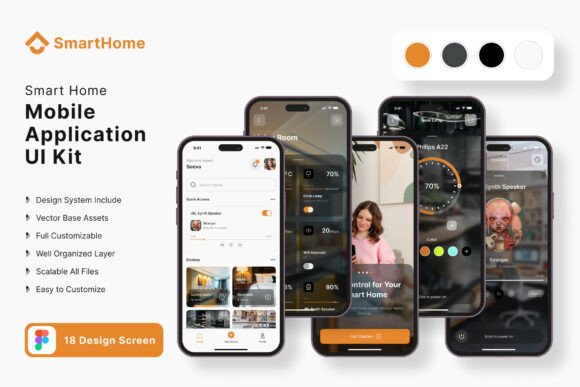
Think of this UI kit not as a finished product, but as a highly organized design system starter pack. It includes 18 pixel-perfect screen designs that cover the common flows you’d need for a smart home app: dashboards, device controls, settings menus, user profiles, and notification centers. Instead of starting with a blank canvas in Figma, you’re starting with a professionally structured set of screens that follow modern design conventions. The real power, however, lies in its composition. With over 80 UI elements – buttons, sliders, icons, cards, and input fields – all built with 100% vector layers, you have the building blocks to construct or modify any screen you can imagine. Need an extra settings panel? Drag, drop, and adjust. Want to add a new device category? Swap out an icon and tweak the color style.
This approach is invaluable for a range of professionals. A freelance designer can use it to deliver a high-fidelity prototype to a client in days instead of weeks, dramatically improving project turnaround and profitability. For a startup founder or small business owner building their first app, it eliminates the steep cost of hiring a UI specialist for the initial design phase, allowing resources to be allocated to development and marketing. Even content creators or marketers looking to build a companion app for their brand can use this kit to mock up a concept quickly, ensuring the visual direction aligns with their existing brand identity before committing to full development.
Customization That Respects Your Brand’s Uniqueness
A common fear with template kits is ending up with a generic-looking product. The Smart Home UI Kit is designed to prevent that. Its "fully editable" nature in Figma means every aspect is malleable. The color styles are easy to change globally, so you can instantly apply your brand’s primary and secondary palette to every component, ensuring visual consistency from the first screen you edit. The free, included fonts and icon vectors are chosen for their clean, modern typography and clarity, which are critical for readability on mobile devices, but you can replace them with your own premium font or typeface that better matches your brand’s personality—whether that’s a sleek sans serif for a tech-forward feel or a friendly script for a more approachable vibe.
Consider the practical applications beyond the app itself. The screens and elements you customize become a goldmine for other design assets. The dashboard layout could inspire the structure for a website landing page. The clean icon set is perfect for social media graphics or instructional blog post images. The overall aesthetic can directly inform your packaging design if you’re selling physical smart home devices, creating a seamless brand experience from the unboxing to the app interface. The 100% scalable vectors ensure that any element you extract will look crisp on a business card, a poster, or a high-resolution display, making it a versatile component of your broader brand identity toolkit.
Integrating the Kit Into Your Design Workflow
To get the most out of a resource like this, approach it strategically. First, don’t feel compelled to use all 18 screens verbatim. Analyze them to understand the design patterns—how information is hierarchy is established, how touch targets are sized for usability, how color and spacing guide the user’s eye. Then, use the provided symbol objects and layered components to build your own unique flows. This is where the kit saves the most time: you’re not drawing basic buttons; you’re arranging pre-built, interactive components into a novel user journey.
When customizing, keep your end-user in mind. If your app targets a broad audience, prioritize readability with high-contrast color combinations and ample whitespace. Test your font pairings within the kit’s framework; maybe use the included display font for headings and a highly legible sans serif for body text. The kit’s structure makes it easy to swap these out and see the effect instantly across multiple screens. This process of testing and refining within a solid framework is how you move from a generic template to a polished, professional presentation that can genuinely engage your audience.
Finally, remember that this is a tool for creation, not a final license to ship. All images used in the preview are for demonstration only and are not included, so you will need to source your own photography or illustrations that reflect your specific brand and product. The value of the Smart Home Application Mobile UI KIT is in the immense head start it provides on the structural and component-level design work. It handles the heavy lifting of building a coherent, modern design system, freeing you to invest your creative energy into the unique details, interactions, and content that will make your application stand out in a crowded market. By leveraging this kind of thoughtful design asset, you can transform a daunting project into a manageable and even exciting creative endeavor.