Build Your AI Chat App Faster with a UI Kit
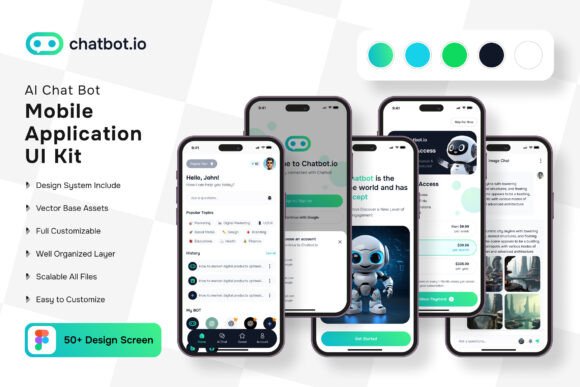
Developing a mobile application from scratch is a significant undertaking. Between the backend logic, frontend interface, and user experience design, the process can quickly become overwhelming. For entrepreneurs and developers looking to bridge the gap between an idea and a functional prototype, the AI Chat Bot App Mobile UI Kit offers a practical shortcut. This collection of 50 pixel-perfect screen designs provides a robust framework for creating a modern chat application, eliminating the need to build every component from zero.
What Exactly Is This UI Kit?
Think of this kit as a comprehensive toolbox filled with pre-designed, high-quality building blocks specifically for mobile chat interfaces. It’s not just a few static images; it’s a fully editable system created in Figma. The package includes over 80 UI elements—buttons, message bubbles, navigation bars, profile sections, and settings screens—that are organized, layered, and ready to be customized. Since everything is built with 100% vector layers and scalable vectors, you can resize any element without losing clarity, which is essential for supporting various device screens.
The real value lies in its editability. Every component is a symbol object, meaning a change to a master element can propagate across your entire design, saving you countless hours. You can easily adjust colors, swap icons (free icon vectors are included), and modify layouts to match your brand’s visual identity. The inclusion of free fonts also helps streamline the initial design phase, allowing you to focus on functionality and user flow rather than hunting for assets.
Practical Applications Beyond the Chat Interface
While the kit is built for AI chat bots, its modular nature makes it adaptable for a range of mobile projects. The clean, modern typography and intuitive layout patterns can inform the design of customer service apps, social messaging platforms, or even internal business communication tools. For a small business owner, this means you can rapidly prototype an app concept to present to stakeholders or investors, demonstrating a polished user experience without a massive upfront investment in design.
The visual consistency of the kit is a major benefit for branding. By using the same button styles, color palettes, and typographic hierarchy throughout your application, you create a cohesive brand experience. This consistency extends to marketing materials. You can extract elements from the UI kit to design matching social media graphics, website banners, or even email templates that feel unified with your app’s interface, strengthening overall brand recognition.
Streamlining Your Design and Development Workflow
One of the biggest hurdles in app development is the design-to-development handoff. A well-organized UI kit like this one acts as a single source of truth. Because it’s fully layered and uses symbols, developers can easily inspect elements, understand spacing, and extract assets. This reduces miscommunication and speeds up the coding process. For designers, it provides a solid foundation to build upon, freeing up creative energy to focus on unique features and user-specific interactions rather than reinventing common UI patterns.
Readability is paramount in a chat application. The designers of this kit have likely considered text legibility, contrast ratios, and touch target sizes—all critical factors for a positive user experience. By starting with these pre-tested components, you inherit these best practices, ensuring your final product is not only good-looking but also accessible and easy to use for your audience.
Making It Your Own: Customization and Integration
The instruction to "customize the screen as needed by adding or subtracting certain elements" is key. This isn’t a rigid template; it’s a flexible starting point. You might love the message thread layout but want to replace the profile picture module with a product recommendation widget. The kit’s structure allows for that kind of modular thinking. You can mix and match screens, create new combinations, and tailor the flow to your specific application’s purpose.
When customizing, consider your project’s goals. Is the primary function customer support? You might emphasize the input field and quick-reply buttons. Is it for community building? Perhaps you expand the user profile and group chat sections. The 50 screens provided cover a wide range of scenarios—from onboarding and login to settings and notifications—giving you a complete user journey to work with.
A Launchpad for Your Mobile Vision
The AI Chat Bot App Mobile UI Kit is more than a set of pretty screens; it’s a strategic asset for anyone looking to enter the mobile space efficiently. It solves the blank canvas problem, accelerates the prototyping phase, and ensures a professional, modern aesthetic from the outset. By leveraging its scalable vectors, editable components, and thoughtful organization, you can allocate more of your valuable time and resources to refining your core business idea and less on the foundational, yet time-consuming, work of interface design. It’s a practical tool that turns a complex project into a manageable one, helping you bring your chat application vision to life with greater speed and confidence.