Environ Google Slides: A Visual Toolkit for Modern Brands
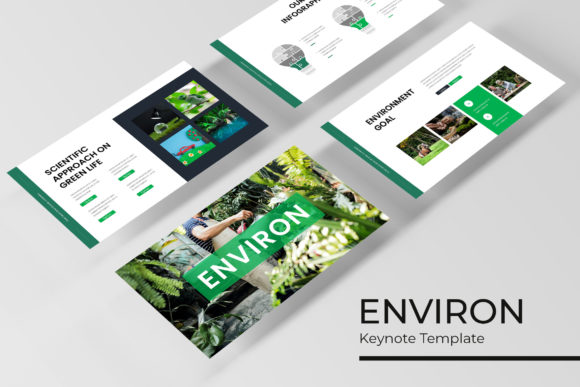
There's a particular kind of frustration that hits when you're staring at a blank slide deck, knowing you need to present your brand's story in a way that's both professional and memorable. You want cohesion, you want visual interest, and you definitely don't want to spend hours wrestling with formatting. That's the exact problem the Environ Google Slide Template was built to solve. It's not just a collection of pretty slides; it's a structured system designed to give designers, entrepreneurs, and content creators a serious head start on their presentation game. With over 150 total slides across five distinct color palettes, it offers a depth that goes far beyond most templates you'll find online.
Beyond the Basics: What Makes a Presentation System Truly Useful
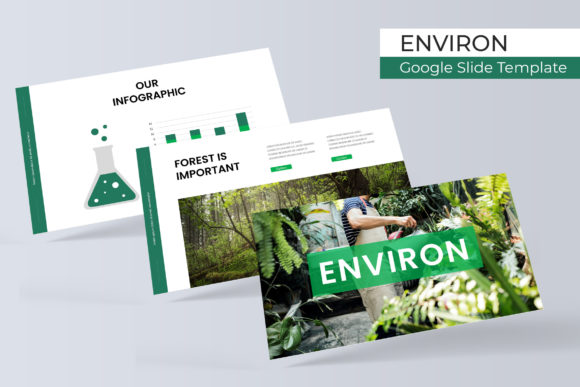
Many templates offer a handful of slide layouts and call it a day. The Environ template takes a different approach. Each of its five premade color schemes isn't just a simple recolor—it's a complete, cohesive presentation with 30 carefully crafted slides. This means you're not just choosing a color; you're choosing a mood and a visual direction. The "Pixel-perfect illustrations" and "Handcrafted Infographic" sections are where the real value shines. Instead of generic clip art, you get thoughtfully designed elements like data visualization charts, process diagrams, and timeline graphics that actually help communicate complex ideas clearly. For a small business owner pitching to investors or a marketer outlining a quarterly strategy, these aren't just decorative—they're functional tools that make information digestible.
Practical Applications for Branding and Communication
Think about the last time you had to create a brand guidelines presentation, a product launch deck, or a workshop proposal. The consistency of your visual identity across these materials directly impacts how seriously your audience takes you. The Environ Google Slides system supports this need perfectly. The "Section Break Slides" create natural pauses in your narrative, while the "Gallery and Portfolio slide" layouts are ideal for showcasing work samples, product photography, or client testimonials without looking cluttered. Because every element is based on Master Slides, making a global change to your font or color accent is a matter of seconds, not hours. This level of control is crucial for maintaining a professional brand identity across multiple presentations or for teams where several people might be editing the same deck.
From Digital Decks to Tangible Design Assets
While the template is built for Google Slides, its utility extends into other areas of your visual branding. The consistent use of typography, spacing, and color within the template can serve as a direct reference for other design projects. Need to create a matching one-page PDF for a lead magnet? Pull the color codes and font pairings directly from your slide master. Designing social media graphics for an upcoming campaign? The infographic elements can be adapted into standalone Instagram carousels or LinkedIn posts. The "Resizable and Editable Graphic Picture Placeholder" feature is a huge time-saver here—it allows you to drag and drop your own images into pre-designed frames, ensuring your visuals always look polished and properly composed, whether they're destined for a slide, a blog header, or a printed flyer.
This kind of cross-platform consistency is what separates a brand that looks thoughtfully assembled from one that feels disjointed. The Environ template essentially provides a visual language you can extend. The modern, clean aesthetic—think balanced whitespace, clear hierarchy, and sophisticated infographics—translates well to packaging mockups, event invitations, or even the layout of an editorial lookbook. It gives you a foundational style to build upon.
Choosing Your Direction and Making It Your Own
With five color variations at your fingertips, the first step is choosing the one that best aligns with your brand's personality or the specific project's tone. Is your brand calm and trustworthy? Perhaps a palette with muted blues and greens is the way to go. Is it energetic and bold? A scheme with vibrant accents might be more appropriate. Don't just pick your favorite color; consider the psychological associations and how they'll be perceived by your target audience. Once you've selected a base, the real customization begins. The template includes a "Readme First" file and links to the free fonts used, which is a critical detail for maintaining that pixel-perfect look. Always download and install those fonts before you start editing to avoid any last-minute formatting surprises.
A practical tip: use the master slides to your advantage. Before you add your own content, take ten minutes to explore the slide master view. You can globally adjust the default text styles, swap out accent colors to better match your specific brand palette, or even modify the layout of recurring elements like headers and footers. This upfront investment ensures that every new slide you create automatically adheres to your customized system, saving you a tremendous amount of time and preventing inconsistencies down the line. The goal is to make the template work for you, not the other way around.
Final Thoughts on Workflow and Professional Polish
Ultimately, a tool like the Environ Google Slide Template is about reducing friction in your creative and business processes. It provides a professionally designed starting point so you can focus on your message, your story, and your strategy. The inclusion of "5 PPTX Files" and "5 PPTX Widescreen" formats ensures compatibility whether you're presenting on a standard screen or a wide conference room display. Remember, the photographs and pictures shown in previews are for illustration only—you'll need to source your own imagery. But that's where the true personalization happens. By combining this robust template system with your own unique content, brand photography, and strategic messaging, you transform it from a generic download into a powerful extension of your brand identity. It’s a practical asset for anyone who needs to communicate ideas clearly and look exceptionally good while doing it.