Clothie Keynote Template: A Toolkit for Polished, Professional Presentations
You’ve spent hours perfecting the content for your big pitch, workshop, or client report. The data is solid, the narrative is compelling, and you’re ready to make an impact. But when you open your presentation software, the default templates feel uninspired, and building a visually stunning deck from scratch seems like a daunting task that will steal time from what really matters: refining your message. This is a common hurdle for entrepreneurs, designers, and marketers alike. A powerful presentation isn’t just about what you say; it’s about how you say it, and the visual framework you choose to deliver your ideas. This is where a thoughtfully designed resource like the Clothie Keynote Template steps in, not as a magic solution, but as a substantial foundation to build upon.
Beyond Slides: Building a Visual Narrative
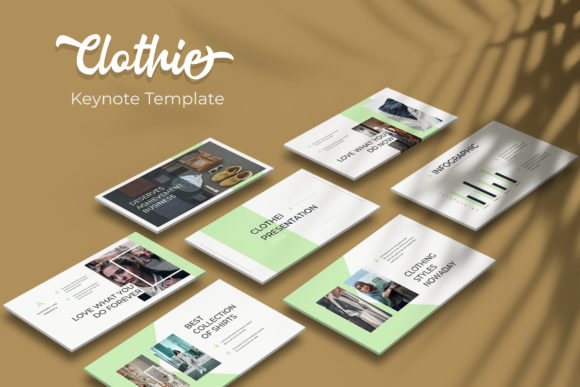
The first thing you’ll notice about the Clothie Keynote Template is its commitment to visual coherence. With over 150 total slides, the sheer volume is impressive, but the real value lies in the structure. It’s organized into five distinct, premade color palettes, each containing 30 meticulously crafted slides. This approach understands a fundamental truth of branding and design: consistency is key. Instead of offering a chaotic mix of styles, it provides curated visual languages. Whether you’re presenting a minimalist brand strategy, a vibrant creative portfolio, or a data-driven marketing report, you can select a color scheme that aligns with your project’s personality and stick with it throughout the deck. This built-in consistency helps reinforce brand recognition and presents a polished, professional image from the first slide to the last.
For a small business owner preparing a investor pitch, this means your presentation will look and feel intentional. For a designer showcasing a client’s branding package, it allows the work itself to shine within a complementary, non-distracting environment. The templates are more than just backgrounds; they are storytelling frameworks. The inclusion of handcrafted infographics, section break slides, and dedicated gallery and portfolio layouts means you’re equipped to transform raw data and images into a compelling visual story. You’re not just placing bullet points on a page; you’re given the tools to create information hierarchy, guide the viewer’s eye, and make complex information digestible and engaging.
Practical Design for Real-World Workflow
A beautiful template is useless if it’s difficult to customize. This is where practicality meets design. The Clothie template is built on master slides, which is the professional standard for presentation design. This means that global changes—like updating your brand’s primary color or adjusting a font style—can be made in one place and will automatically cascade throughout the entire presentation. It’s a massive time-saver that ensures pixel-perfect consistency, eliminating the tedious task of editing 150 slides individually.
The resizable and editable graphics and picture placeholders are another significant workflow enhancement. Instead of wrestling with alignment and sizing, you can simply drag and drop your own images into pre-formatted areas. This is particularly useful for:
- Portfolio Presentations: Quickly insert project mockups, website screenshots, or product photos into a clean, uniform grid.
- Marketing Reports: Drop in charts, social media post images, or ad creative without breaking the slide’s layout.
- Internal Decks: Maintain a professional look for team meetings and project updates by using consistent imagery placeholders.
This focus on editable elements respects your time and reduces the friction between having an idea and presenting it beautifully. The pixel-perfect illustrations included add another layer of polish, providing visual metaphors for concepts that might be difficult to photograph, ensuring every slide looks considered and complete.
Integrating a Template into Your Brand Ecosystem
Think of a presentation template not as an isolated file, but as a potential extension of your brand’s visual identity system. The right template can serve as a starting point for developing broader design assets. By using the Clothie Keynote Template’s color schemes and layout principles, you can inform the look and feel of other materials. The clean typography and structured layouts might inspire a new approach to your website’s content pages or the hierarchy of your printed brochures.
For content creators and bloggers, this template can be a springboard for creating valuable digital products. A well-designed slide deck can be repurposed into a downloadable PDF guide, a series of social media graphics, or even the basis for a mini-course. The professional appearance elevates the perceived value of your content. Similarly, for entrepreneurs crafting a pitch deck, the template’s structure can help you logically organize your thoughts, ensuring you cover all critical points—from problem and solution to team and financials—in a visually engaging way that holds attention.
Making the Most of Your Design Toolkit
To truly leverage a resource like this, consider these practical steps:
- Start with Your Content: Before diving into customization, have your key messages, data points, and images organized. This will make the process of selecting the right slides and color scheme much more efficient.
- Customize Thoughtfully: Use the master slides to establish your brand’s core colors and a clean, readable font pairing. Don’t feel obligated to use every single slide; curate the ones that best serve your narrative. A deck with 20 focused, well-designed slides is far more powerful than a 50-slide deck with filler.
- Test for Readability: As you add your text, step back and view the slides at a small size (like in slide sorter view). Ensure your font choices are legible and that there is sufficient contrast between text and background. The included free font is a great starting point, but always prioritize clarity for your specific audience.
- Review the License: The package includes commercial license files, which is crucial. Always review the readme and license details to understand how you can use the final presentation, especially if it’s for client work or digital products for sale.
Ultimately, a tool like the Clothie Keynote Template is about removing barriers. It provides a professionally designed foundation so that you, whether you’re a marketer, a startup founder, or a creative professional, can focus your energy on your core message. It helps bridge the gap between having great ideas and presenting them in a way that commands attention, builds credibility, and looks impeccably professional. In a world where visual communication is paramount, having a reliable design asset in your toolkit isn’t just a convenience—it’s a strategic advantage.