Design Smarter Presentations with the Clayzone Template
You know the feeling. You've spent hours tweaking a slide deck, moving text boxes pixel by pixel, trying to make charts look halfway professional, and wrestling with color schemes that never quite work. By the time you're done, the actual content feels like an afterthought. What if there was a way to skip that frustration entirely and land on a polished, visually cohesive presentation in minutes instead of hours?
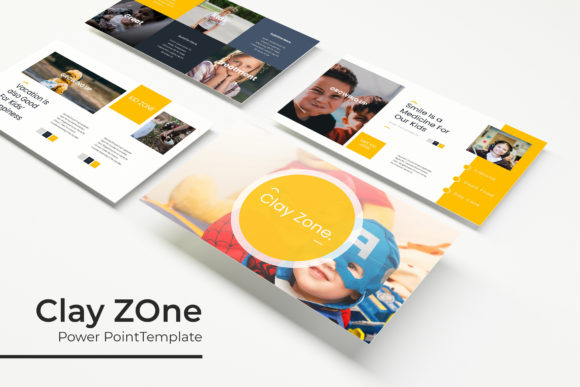
That's exactly where the Clayzone Power Point Template comes in. It's not just another set of slides with generic layouts. This is a carefully designed system of 150+ total slides built across five premade color variations, giving you 30 slides per template and serious creative flexibility. Whether you're pitching investors, presenting a marketing strategy, showcasing a portfolio, or teaching a workshop, having a well-structured template underneath your content changes everything about how your audience receives your message.
What Makes This Template System Stand Out
Most presentation templates give you a handful of layouts and call it a day. Clayzone takes a different approach. Each of the five color variations is a complete, standalone template with 30 thoughtfully designed slides. That means you're not just getting five versions of the same thing. You're getting five distinct visual identities to work with, each one handcrafted with consistent typography, balanced whitespace, and purposeful graphic elements.
The infographic sections deserve special attention. If you've ever tried to build a data visualization from scratch in PowerPoint, you know how painful that process can be. Clayzone includes handcrafted infographics that actually look like they were made in a professional design tool. These aren't clunky clip art replacements. They're clean, modern illustrations with pixel-perfect detail that communicate information clearly without overwhelming the viewer.
Section break slides are another thoughtful inclusion. These act as visual pauses in your presentation, giving your audience a moment to absorb what they've just seen before you move into the next topic. It's a small detail, but it makes a significant difference in how well people follow your narrative flow.
Practical Applications Beyond the Boardroom
While the Clayzone Power Point Template excels in traditional business presentations, its usefulness extends far beyond quarterly reviews and sales pitches. Consider how versatile a well-designed slide deck really is.
Brand presentations and style guides benefit enormously from a template like this. If you're a freelancer or agency presenting brand identity concepts to clients, the gallery and portfolio slides give you dedicated space to showcase logos, color palettes, and typography choices in a format that feels intentional rather than thrown together. Clients respond differently to work that's presented with confidence, and the visual framework you use plays a huge role in that perception.
Social media content creators can repurpose individual slides as Instagram stories, LinkedIn carousels, or Pinterest graphics. Export a slide as an image, and you've got a ready-made graphic that maintains your visual consistency across platforms. This kind of cross-platform cohesion is something most creators struggle with, and having a template system that produces consistent output solves that problem elegantly.
Educators and workshop facilitators will find the structured layouts particularly useful. Teaching complex topics requires clear visual hierarchy, and the Clayzone slides are built with that in mind. The resizable and editable graphic elements let you customize diagrams and illustrations to match your specific curriculum without starting from zero.
Small business owners pitching to potential partners or presenting at local events need materials that look professional without hiring a designer for every project. The drag-and-drop picture placeholders make it genuinely easy to drop in your own product photos, team images, or location shots. You're not fighting the template to make it work for your content. The template is designed to adapt to you.
Working Smarter with Design Assets
One of the most practical features of this system is that everything is based on master slides. If you've never worked with master slides before, here's why it matters. Instead of editing each individual slide when you want to change a font, adjust spacing, or modify a color, you make one change on the master slide and it cascades through the entire presentation. This saves enormous amounts of time and, more importantly, prevents the inconsistencies that creep in when you're manually updating dozens of slides.
The five PPTX files included come in widescreen format, which is the standard for modern displays and projectors. You also get a readme file with setup instructions and links to download the free fonts used in the design. This is a detail that matters more than people realize. There's nothing worse than opening a template and seeing broken font references because you don't have the right typeface installed. Having the font download link included upfront eliminates that headache.
Let's talk about the color variations for a moment. Five premade color schemes might sound limiting at first, but think about how most people actually use presentations. You typically have one or two brand colors that need to be present. Starting with a color scheme that's already harmonious and then tweaking it to match your specific brand is infinitely faster than building a palette from scratch. Each of the five options provides a different mood and energy level, so you can select the one that best aligns with your message and then fine-tune from there.
Tips for Getting the Most Out of Your Template
Having a great template is only half the equation. How you use it determines whether your presentation feels polished or generic. Here are some practical recommendations based on real-world experience with presentation design.
Start by selecting your color variation before you add any content. Look at the five options and think about the emotional tone of your presentation. A bold, high-contrast scheme works well for pitches and sales presentations where you need energy and urgency. Softer, more muted palettes are better suited for educational content, internal communications, or presentations where you want the audience to feel calm and focused.
Don't use every slide. This is a common mistake with template systems. Just because 30 slides are available doesn't mean your presentation needs to be 30 slides long. Choose the layouts that serve your specific content and delete the rest. A tight, focused 15-slide presentation will always outperform a meandering 30-slide one.
Take advantage of the picture placeholders intentionally. Rather than dropping in random stock photos, think about what imagery reinforces your specific points. If you're presenting data about customer growth, use a relevant chart or graph slide. If you're showcasing products, use the portfolio layouts. The template gives you structure, but your content choices determine the impact.
Pay attention to the infographic slides and consider whether your data actually fits those visual formats. Not every set of numbers needs to be a chart. Sometimes a simple comparison layout communicates your point more effectively than a complex visualization. The Clayzone infographics are designed to be flexible, so experiment with different ways to present your information before committing to one approach.
A Realistic View on Licensing and Usage
It's worth noting that the photographs and preview images shown in the template marketing materials are not included in the download. This is standard practice for presentation templates, and it's actually a good thing. It means you're not locked into someone else's aesthetic choices for imagery. You get to use your own photos, your own brand imagery, or properly licensed stock photos that align with your specific project.
The fonts included are free for both personal and commercial use, which removes a significant barrier for small business owners and freelancers who worry about licensing complications. You can use the finished presentations in client work, at conferences, in webinars, or as downloadable lead magnets without running into legal gray areas.
For anyone who regularly creates presentations, whether for client work, internal communications, or public speaking, having a reliable template system like Clayzone in your toolkit eliminates the most tedious parts of the process. You spend less time on formatting and more time on the ideas and stories that actually matter. That shift in where you direct your creative energy is, ultimately, the real value here.