Elegant Podcast Night: Crafting a Perfect Social Media Post
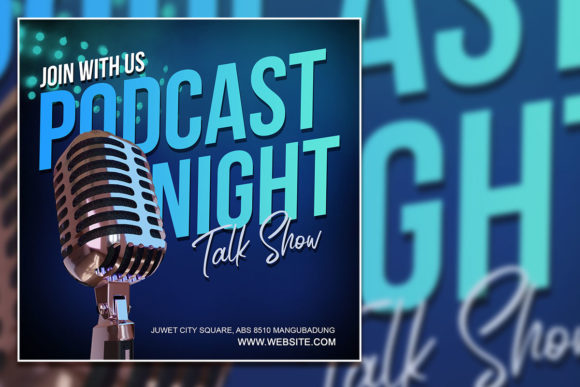
Imagine your followers scrolling through a sea of generic content, their eyes glazed over, until a single post stops them in their tracks. It’s not just the image, but the typography that speaks volumes. That’s the power of a well-designed social media graphic, and it’s precisely what the Elegant Podcast Night Social Media Post feature is built to deliver. This isn’t just another template; it’s a complete visual toolkit designed to make your podcast promotion look professionally crafted with minimal effort.
Let’s break down what you’re actually getting. This package provides a single, meticulously organized PSD file sized at 2000 x 2000 pixels—the ideal square format for platforms like Instagram, Facebook, and LinkedIn. The 72 DPI and RGB color profile are optimized for screen display, ensuring your colors pop with vibrancy on any device. But the real magic lies in its structure: 100% layered and fully editable. Every element, from the background texture to the text placeholders, is on its own layer. This means you can change colors, swap out fonts, adjust the layout, or completely restructure the design in Adobe Photoshop without touching the core composition. It’s print-ready in format, meaning if you decide to turn your digital post into a poster or flyer, the file is structured to handle that transition smoothly.
A Design That Speaks Your Brand’s Language
Visual consistency is the backbone of brand recognition. When your audience sees a post, they should immediately know it’s yours. This template’s modern typography and elegant layout provide a neutral yet sophisticated canvas. It doesn’t scream with a specific personality; instead, it offers a refined stage for your content. The included 100% free font is a thoughtful choice, removing a common barrier for creators. You won’t need to hunt for a typeface or worry about licensing for the preview. Simply install the font, open the PSD, and you’re ready to customize.
This approach is invaluable for small business owners and content creators who need to maintain a professional presentation without a dedicated design team. Think about your podcast’s visual identity. Are you a true-crime series with a moody, mysterious vibe? A business interview podcast with a clean, corporate feel? A comedy show bursting with energy? The layered structure allows you to adapt the template’s mood by changing color palettes and swapping the placeholder images with your own high-quality photos. Replace the preview image with a compelling shot of your podcast guest, your recording setup, or a relevant thematic image. The process is designed to be intuitive, so you don’t need to be a Photoshop expert to achieve a polished result.
Beyond the Podcast: Practical Applications for This Asset
While its name highlights podcast promotion, the utility of this social media graphic extends far beyond announcing new episodes. Consider it a versatile component in your broader marketing assets toolkit.
- Brand Identity & Logo Design: Use the typography and layout style as inspiration for your wider brand language. A consistent typographic voice across your logo, website, and social posts builds trust.
- Website & Blog Headers: Resize and adapt the design to create striking hero images for your blog posts or website banners, especially for content related to your podcast topics.
- Digital Products & Packaging: If you sell digital downloads, courses, or merchandise, this elegant style can be repurposed for product mockups, sales page graphics, or even simple packaging labels.
- Editorial Layouts & Invitations: The clean, layered format makes it easy to extract elements for use in digital magazines, newsletter designs, or event invitations for live podcast recordings.
The key is to see this not as a one-time-use template, but as a design asset that teaches you a principle: how to structure information elegantly. By deconstructing its layers, you learn how professional designers balance text, imagery, and whitespace to guide the viewer’s eye.
Making Smart Typographic Choices for Your Project
The font included is a starting point. A crucial step in customization is ensuring the typography aligns with your project’s goals. A display font or serif font might convey tradition and authority, perfect for a history or finance podcast. A sans serif font feels modern, clean, and approachable—ideal for tech, wellness, or lifestyle content. A script font or handwritten font adds a personal, artisanal touch, great for creative, craft, or storytelling podcasts.
When you customize this template, think about font pairing. The principle is contrast with cohesion. If you keep the elegant display font for your podcast title, pair it with a simple, highly readable sans serif for the episode details or guest name. This creates hierarchy and ensures your message is both beautiful and clear. Always test readability at the actual size it will be viewed. Zoom out to 100% in Photoshop to see if the text is legible on a phone screen. Check the contrast between your text color and the background—light text on a dark background or vice versa is usually safest for quick scrolling.
Before finalizing your design, review all the included font styles and weights. Does the template offer bold, italic, or condensed versions? Using these can add emphasis without cluttering your layout with too many different typefaces. And always, always check the commercial licensing of any font you choose to use beyond this template. The included font is free, but if you decide to swap it for a premium font you purchased, ensure its license covers the intended use—whether for a digital social media post or a printed poster.
A Seamless Workflow for Busy Creators
The true value of a resource like the Elegant Podcast Night Social Media Post lies in its ability to streamline your workflow. The note that images are not included is standard practice—it encourages you to use your own original photography, which strengthens your brand’s authenticity. The process is straightforward: open the PSD, locate the smart object or placeholder layer for the image, double-click it, paste your photo, save, and watch it update seamlessly in the main design. The layered structure means you can make non-destructive edits, experiment freely, and revert changes if needed.
This efficiency is a game-changer for entrepreneurs and marketers juggling multiple tasks. Instead of starting from a blank canvas each week, you have a reliable, professional template that ensures your podcast promotion is always visually cohesive and high-quality. It transforms a potentially time-consuming design task into a quick, templated process, freeing you up to focus on creating great content. The result is a consistent, engaging visual presence that helps build audience engagement and reinforces your brand identity with every post you share.